
Standby
A wall panel spends most of the day doing nothing. Standby is that resting state. It should be readable from across the room and quiet until touched.
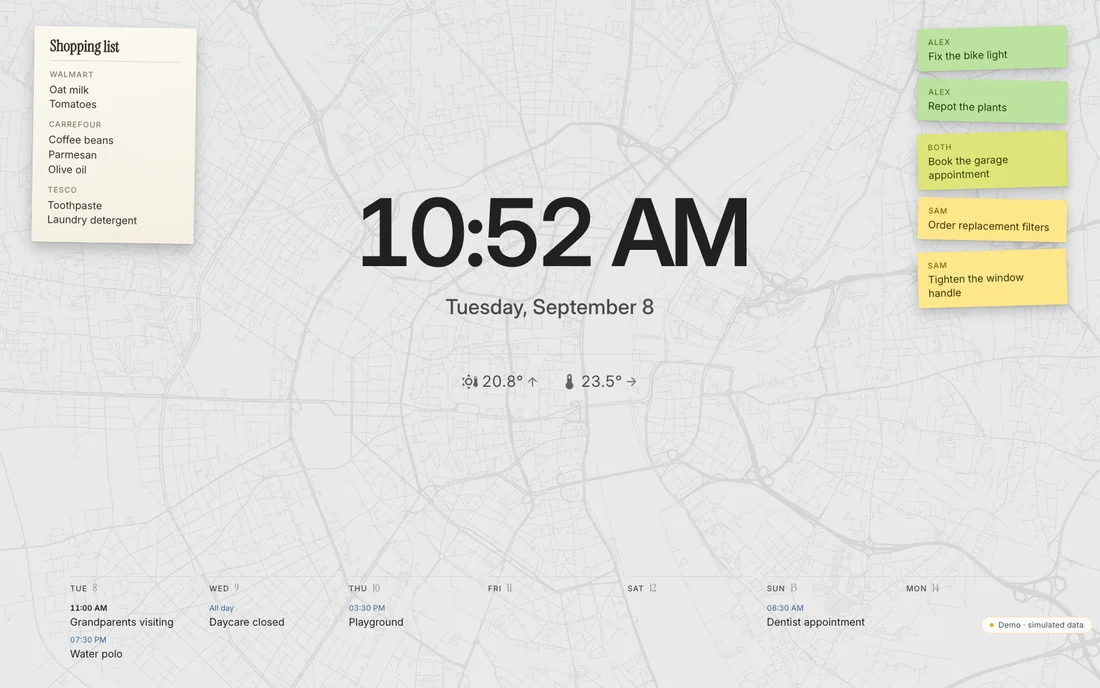
What it shows
Section titled “What it shows”- The clock and the date.
- Outdoor and indoor temperature with a trend.
- The week strip with upcoming appointments. It can be switched off under Appearance → Ambient & standby → Calendar in standby.
- Reminders as coloured notes and the shopping list.
- Weather passing behind the clock: rain, snow, cloud. Switch Weather in standby under Ambient & standby.
- An optional street map of your own town. See OpenStreetMap.
- One line for moments: a birthday, the first snow. See Presence and moments.
Touching the calendar or the notes opens that screen. Touching anything else opens the home screen. The opening is a soft ring from your finger, not a cut.
When it starts
Section titled “When it starts”Settings → Appearance → Ambient & standby:
- Time until standby sets the idle delay, or switches standby off for this device.
- Start standby switches now. The standby button in the title bar does the same.
Deep night
Section titled “Deep night”Between 22:00 and 06:00 the screen dims to an eye-friendly deep night. The map disappears. Switch it under Deep night.
Presence
Section titled “Presence”A motion detector can wake the panel from standby. When every resident is away, standby stays black. The first person home is greeted. All three are off by default. See Presence and moments.
Ambient light
Section titled “Ambient light”Brightness follows the room in the stage’s layout menu lets a light sensor in the room or in the panel dim the interface along with the room.
Hidden gestures
Section titled “Hidden gestures”- Long-press the clock for a large date with seconds.
- Tap the logo three times for a diagnostics view: frame rate, connection age, snapshot age, version. The same gesture reveals the hidden settings sections.
AI text on the lock screen
Section titled “AI text on the lock screen”An optional line generated by a language model. It is off by default and needs a separately running model service. Without one the switch does nothing useful. The built-in lines about weather and appointments need no AI.