
Energy
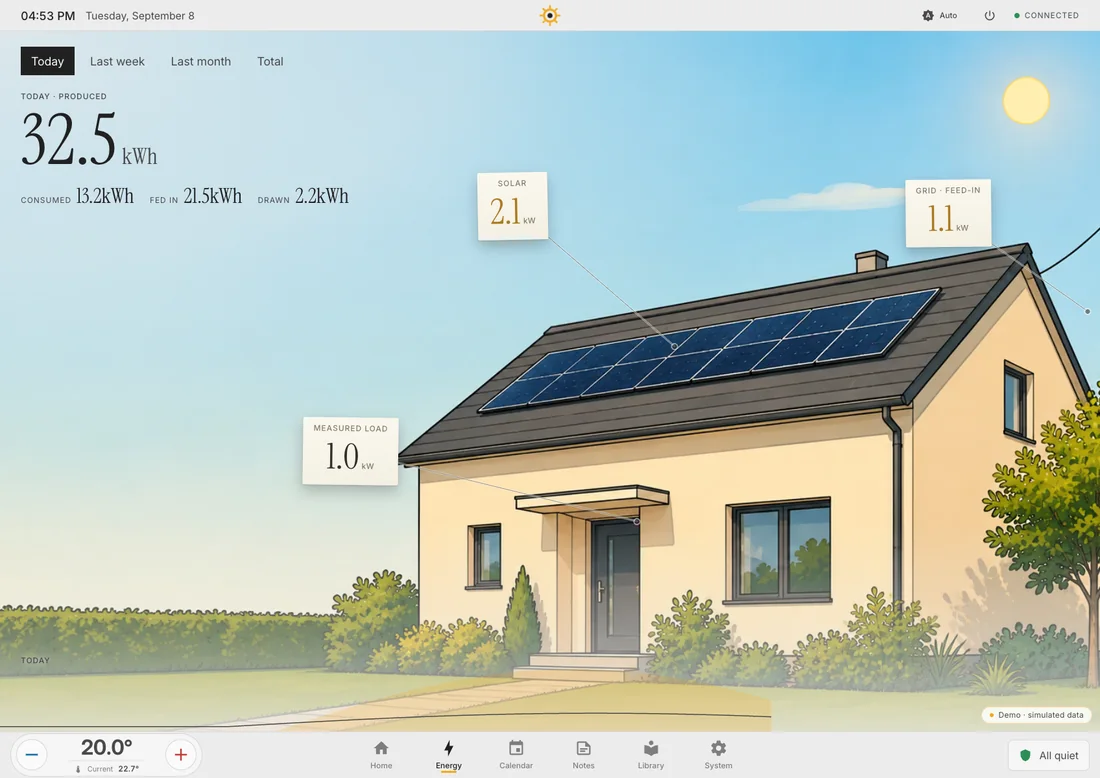
The energy screen is a picture of a house. Live production, measured load and the grid sit as small paper notes in the picture, each pinned to the thing it measures. The free wall carries the day’s figures.
What it needs
Section titled “What it needs”Power sensors in Home Assistant. Settings → Connections → Services → Energy lists every power sensor Home Assistant reports: one source for generation, as many consumers as you like, or Take all. Without a saved selection Hauser uses everything it found.
What it shows
Section titled “What it shows”- Now: live power. Several plugs are called Measured devices, not a house load.
- Today, Week, Month, Total: real sums from Home Assistant’s long-term statistics. The day’s curve comes from five-minute statistics.
- What the house cannot measure gets no note. No dashes, no zeros.
Your own house
Section titled “Your own house”The room-image wizard and the library offer Outside (energy) as a target. An image set assigned there becomes the stage of the energy screen, day and night. The wizard knows solar modules, so the generation note hangs on the real panels.
The picture’s menu
Section titled “The picture’s menu”In edit mode, press and hold the background: create your own house with the wizard, pick a picture from the library, move the notes, or jump to the sensor assignment. Notes and their pins can be dragged. Done keeps the arrangement, Reset returns to the template.
On the phone
Section titled “On the phone”The phone tells the story behind the numbers: power now, the period with a load curve and a comparison with yesterday, and a Top consumers list.